


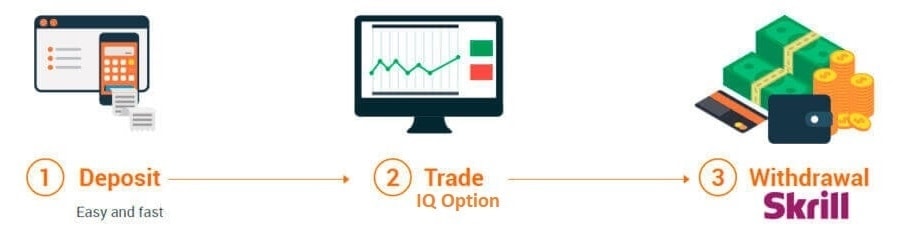
During trading at IQ Option, once there are profits, the first thing we should do is to withdraw money to Skrill. After that, think about the next trading plan.
Profits are only determined when the money is transferred to your bank or Skrill account. If it is still in your IQ Option account, it is simply the deposit amount. In this article, I explain how to withdraw money from IQ Option account to Skrill wallet in detail.
Register an IQ Option account NowGet $10,000 Free for beginners
🔑 Key Takeaways
- Fast Processing: Skrill is one of the fastest payment options available on IQ Option, typically clearing within 1 to 3 business days after broker approval.
- Verification is Mandatory: Complete the Know Your Customer (KYC) process on both platforms prior to requesting a withdrawal to prevent security holds.
- Strict Name Matching: To prevent anti-money laundering (AML) violations, your registered names on IQ Option and Skrill must match exactly.
- Fee Policy Details: Traders receive one free withdrawal request per calendar month. Subsequent requests incur a 2% fee, capped at $30.
- Sound Risk Management: Secure your capital. Never use Martingale, loss-holding, or grid averaging strategies. Protect your balance using the 2% rule and volume-verified entries.
Introduction: The Importance of Realizing Trading Profits
In the world of online trading, a profit is not truly a profit until it has been successfully transferred out of the trading platform and into your personal custody. While watching your account balance grow on a dashboard is satisfying, these numbers remain virtual trading capital until they are withdrawn. The ultimate milestone of a successful trading campaign is realizing those gains, converting technical setups and disciplined execution into spendable currency. For retail traders using the IQ Option platform, one of the most reliable, secure, and popular paths for doing this is withdrawing funds to the Skrill e-wallet.
Skrill has long served as a cornerstone of the online financial ecosystem, offering traders a fast, cost-effective alternative to traditional wire transfers and credit card refunds. In this detailed guide, we will cover the entire process of how to withdraw from IQ Option to Skrill, explaining every step of the transaction, exploring account limits, outlining fee schedules, detailing verification requirements, and resolving common errors like pending or declined statuses. Furthermore, we will touch upon crucial capital protection rules that will help you keep the profits you work so hard to make.
Why Skrill is a Preferred E-Wallet for IQ Option Traders
When selecting a withdrawal method, traders typically look for three key attributes: speed, safety, and fee transparency. While bank transfers and card withdrawals are viable, they often come with structural drawbacks. For instance, credit card withdrawals on IQ Option are legally treated as refunds. This means you can only withdraw up to the exact amount you deposited using that specific card. Any profits generated beyond your initial deposit must be moved using alternative methods, such as bank transfers or e-wallets like Skrill.
Skrill bridges this gap perfectly. As an electronic money institution regulated by the Financial Conduct Authority (FCA) in the United Kingdom, it ensures high-level security for your funds. Unlike bank transfers, which can take up to 5 to 7 business days and incur steep intermediary banking fees, e-wallet transactions are processed rapidly. Once IQ Option’s billing department approves your withdrawal, the funds are usually deposited into your Skrill wallet instantly. From there, you can easily spend the funds online, use the Skrill Prepaid Mastercard, or withdraw the money directly to your local bank account or ATM.
Step-by-Step Walkthrough: How to Withdraw from IQ Option to Skrill
Withdrawing your hard-earned profits from your IQ Option account to your Skrill e-wallet is a straightforward process that can be completed in just a few clicks. Below is a highly detailed, step-by-step breakdown of the procedure.
Step 1: Securely Log in and Audit Your Account Status
Before initiating any transfer, verify that you are logging into the official, authenticated IQ Option web portal or desktop application. Ensure that your internet connection is secure, preferably avoiding public Wi-Fi networks when handling financial transactions. It is highly recommended to enable two-factor authentication (2FA) on both your IQ Option and Skrill accounts to add an extra layer of defense against unauthorized access.
Once logged in, verify your current account balance. Ensure that you do not have any open trading positions that could be adversely affected by a sudden reduction in your account equity. Under-collateralizing open positions can trigger automated margin calls or premature liquidations if the market moves against you.
Step 2: Navigate to the Withdrawal Dashboard
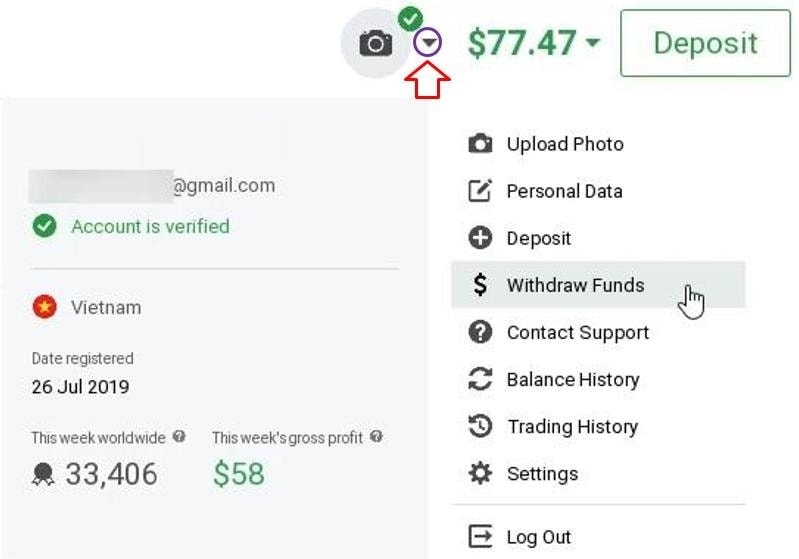
To start transferring money from IQ Option to Skrill, you need to navigate to the financial dashboard. Locate the account dropdown menu in the upper-right corner of the trading interface (often represented by a small triangle or your profile avatar next to your account balance). Click on this menu to reveal a list of options and select “Withdraw Funds.”
It is imperative to note that the amount withdrawn to your Skrill account must be greater than $2. This is the minimum withdrawal limit specified by the IQ Option platform. If your balance is lower than $2, you will need to continue trading using proper risk management until you surpass this threshold, or contact customer support for manual account closure assistance.
Step 3: Choose Skrill and Configure Your Request
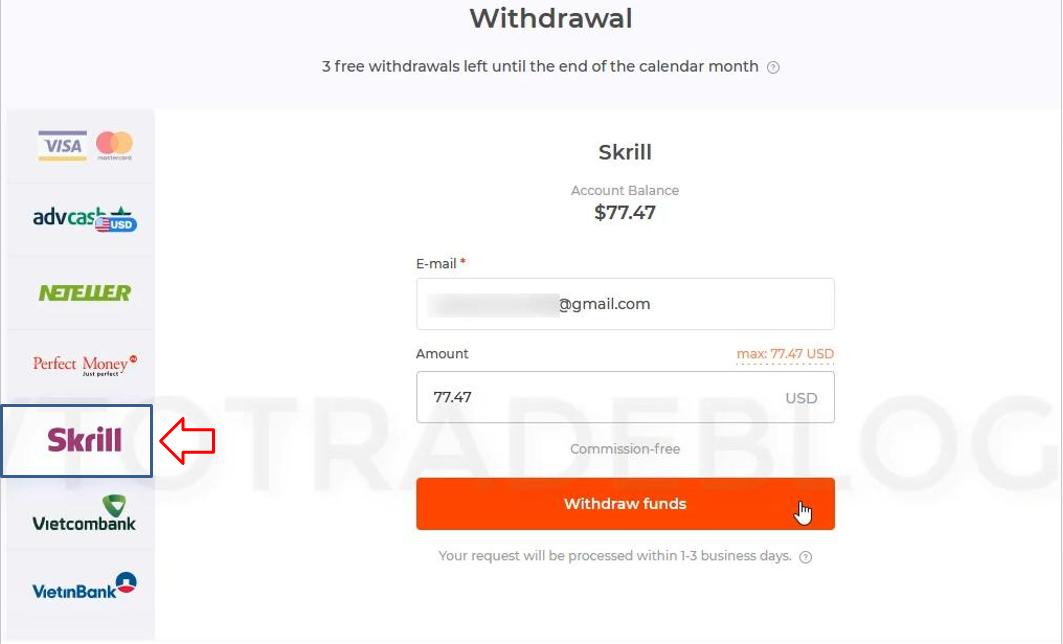
Upon clicking the withdrawal option, you will be redirected to the secure billing portal, presenting various withdrawal methods. Select Skrill from the list of supported electronic payment systems. Here, you will be prompted to provide the following details:
- Skrill Account Email: Fill in the exact email address you used to register and verify your Skrill wallet. Double-check this field for typos, as sending funds to an incorrect or unregistered email address can lead to lengthy retrieval processes or permanent loss of capital.
- Withdrawal Amount: Enter the exact amount of money you want to transfer. This value must be equal to or greater than $2 and must not exceed your available free margin.
When you have carefully verified all the inputted data, click on the prominent “Withdraw Funds” button as shown below.
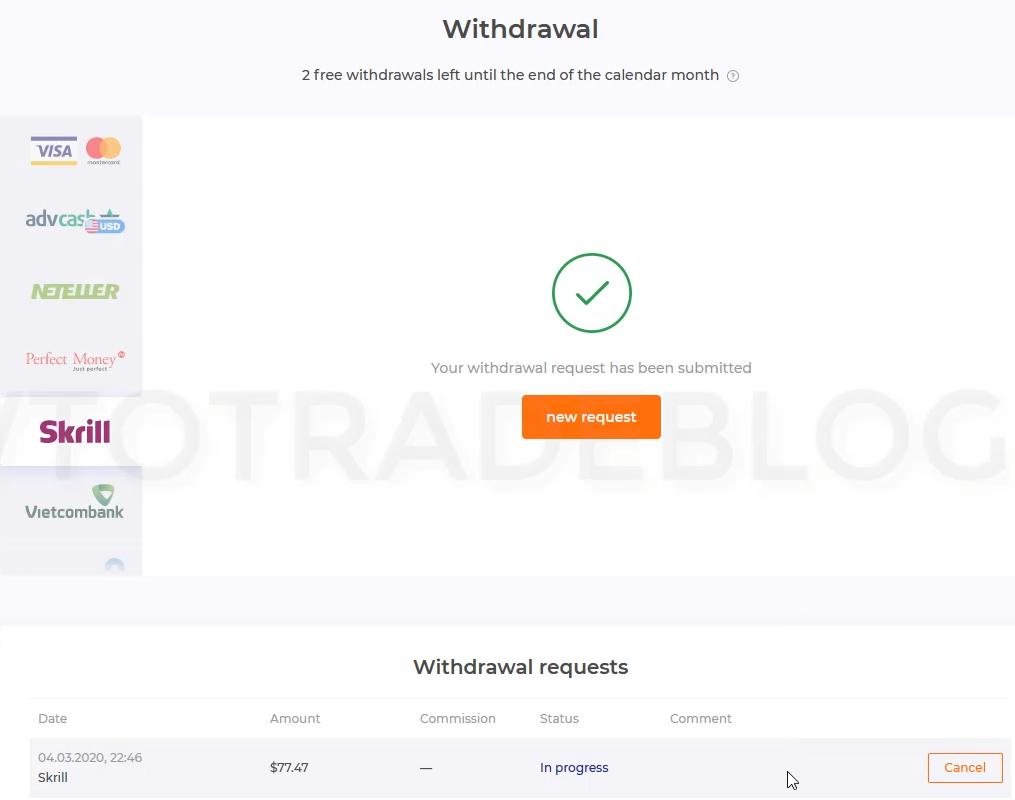
Immediately after clicking the button, a confirmation message will appear indicating that the system has successfully received your withdrawal request. At this stage, the request is logged in the system queue and is marked as “Requested” or “Under Process.”
Step 4: Check and Track Your Withdrawal Status
Once your request has been registered, your IQ Option account’s available balance will adjust accordingly. You can navigate to your transaction history page at any time to monitor the status of the transfer. Under normal operating conditions, IQ Option processes withdrawals within 1 to 3 working days. During this period, the broker’s security and compliance teams verify that the transaction does not violate any security or anti-fraud protocols.
If you have fully verified your identity (KYC) and address on both platforms, the request is typically approved rapidly. Once the status changes to “Completed” or “Funds Sent,” the money will be credited to your Skrill wallet. In the event that you do not receive the funds in your e-wallet after 3 business days, you should contact the IQ Option support team to investigate the issue.
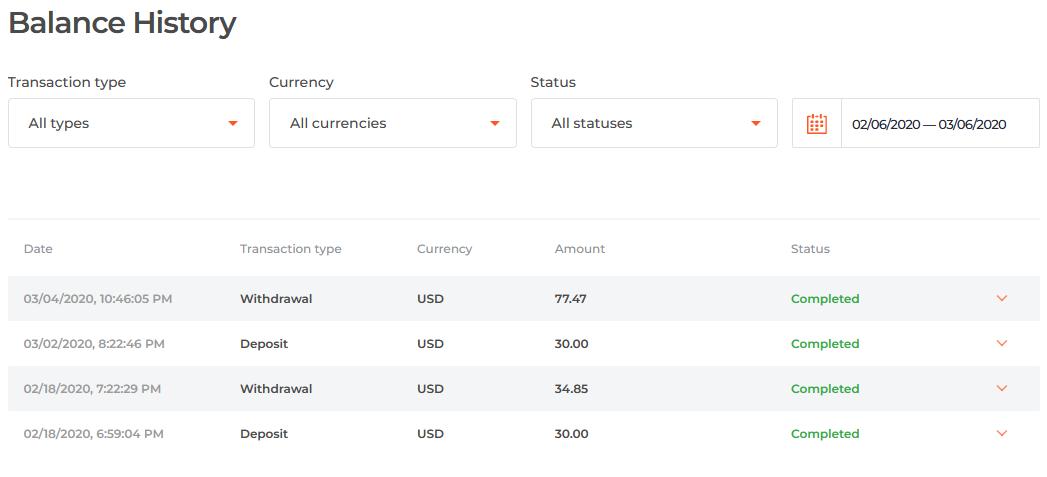
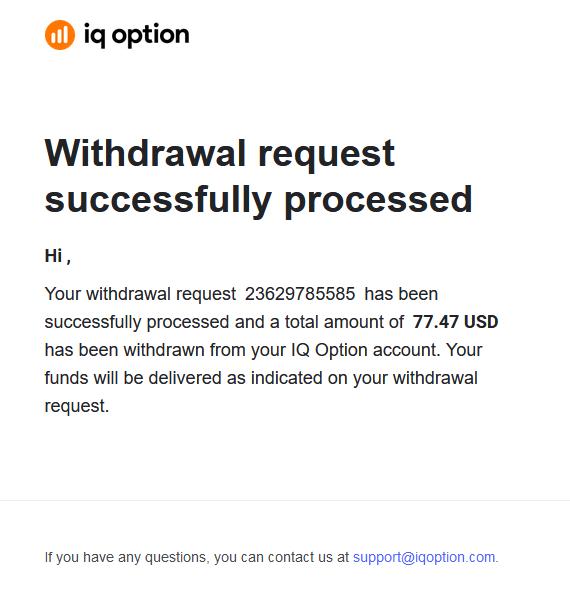
When the transaction is successfully finalized, IQ Option will send an automated notification email to your registered inbox to confirm the transfer details.
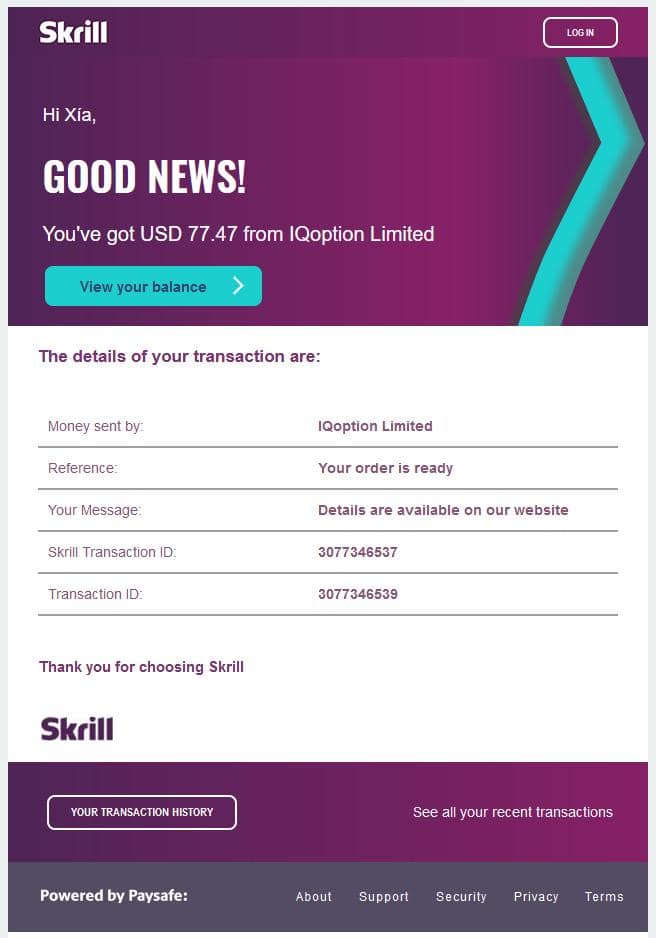
Furthermore, Skrill will simultaneously dispatch an email to notify you that the funds have been successfully received and credited to your balance, outlining the transaction ID and sender details.
IQ Option Skrill Withdrawals vs. Card/Wire Withdrawals: The Comparative Breakdown
To help you understand the structural differences, advantages, and limitations of choosing Skrill over credit cards or traditional wire transfers, we have compiled a detailed comparative table below. This comparison highlights key variables including processing speeds, limits, fees, and operational flexibility.
As the table illustrates, Skrill provides a highly versatile middle ground. It bypasses the deposit-only refund limitations placed on debit/credit cards while processing far quicker than bank wire transfers. For active traders who withdraw profits regularly, e-wallets stand out as the optimal choice for liquidity management.
IQ Option Withdrawal Limits and Fees Explained
To avoid unexpected delays or deductions, it is crucial to understand the rules, limits, and fee schedules established by both IQ Option and Skrill.
Minimum and Maximum Withdrawal Thresholds
IQ Option has set the minimum withdrawal limit for all e-wallets, including Skrill, at $2 (or the equivalent value in other local currencies like EUR or GBP). Any attempt to withdraw less than $2 will be blocked by the interface. On the other end of the spectrum, the maximum withdrawal limit per single transaction is capped at $1,000,000. While this transaction cap is exceptionally high, please be aware that your individual account status, local regulations, or Skrill wallet limit tiers might enforce lower thresholds until additional verification steps are taken on either platform.
The 2% Fee Rule and Free Monthly Withdrawals
IQ Option implements a clear fee structure designed to accommodate both casual and high-frequency traders. Every registered trader is entitled to **one free withdrawal per calendar month**. This free transaction applies regardless of the payment method chosen (Skrill, Neteller, WebMoney, or Bank Transfer).
If you request multiple withdrawals within the same calendar month, a fee will be applied to all subsequent requests. The fee is set at **2% of the requested withdrawal amount**. However, to protect traders withdrawing larger sums, the fee is subject to a minimum charge of $1 and a maximum cap of $30. For instance, if you withdraw $100 for the second time in a month, the fee is $2. If you withdraw $5,000, instead of a $100 fee (which would be 2%), the fee is capped at the maximum of $30. This makes it highly cost-effective for large-volume transactions.
Skrill’s Internal Transaction Fees and Cost Optimization
While receiving funds from IQ Option into your Skrill wallet is typically free on the broker’s side, Skrill itself charges internal service fees when you move money out of their ecosystem. These costs vary depending on your country of residence and the method you select to cash out:
- Withdrawal to Local Bank Account: Skrill usually charges a flat fee (e.g., approximately $5.50 or equivalent) or a percentage fee depending on your region.
- Withdrawal to Visa or Mastercard: Transactions can incur a percentage-based fee, typically ranging between 1.5% and 7.5% of the transfer volume.
- Currency Conversion Fee: If your IQ Option account currency (e.g., USD) does not match your Skrill wallet currency (e.g., EUR), Skrill will apply an internal foreign exchange markup of around 3.99% to perform the conversion. To avoid this, always set up your trading account and e-wallet in the same base currency.
The Crucial Role of Account Verification (KYC)
The single most common reason why traders experience delays, holds, or declined transactions is a failure to complete the account verification process. Because IQ Option is a regulated financial service provider, it is bound by strict international regulations regarding Know Your Customer (KYC) and Anti-Money Laundering (AML) standards. These laws are designed to protect the integrity of the financial system, prevent identity theft, and secure client assets.
Submitting Valid Documents for IQ Option Verification
To lift all withdrawal restrictions on your trading profile, you must complete the multi-stage verification process. This requires uploading digital copies of several documents through your profile dashboard:
- Proof of Identity: A clear, high-resolution photo or scan of a government-issued identification document. This includes a valid passport, national identity card, or driver’s license. The document must show your full name, date of birth, photo, expiration date, and signature. All four corners of the document must be visible, and the image must be free of glare or blur.
- Proof of Address: A document confirming your residential address, issued within the last 90 days. Acceptable documents include utility bills (electricity, water, gas, or landline phone), bank statements, or official government tax letters. Mobile phone bills and screenshots of digital documents are typically rejected. The document must display your full name, address, date of issue, and the logo of the issuing institution.
The verification review process can take anywhere from a few hours to 3 business days. It is highly recommended to complete this verification immediately after opening your account, rather than waiting until you decide to withdraw your funds.
The Unbreakable Name Matching Rule (Anti-Money Laundering)
Under international anti-money laundering regulations, a regulated broker is strictly prohibited from transferring funds to third-party accounts. This means the name registered on your IQ Option trading account **must match the name on your Skrill account exactly**.
If you attempt to withdraw funds to a Skrill account belonging to a spouse, family member, or friend, the system will flag the transaction as a security violation. This will result in an immediate transaction decline and may trigger a temporary or permanent suspension of your trading profile for investigation. Always ensure that you are withdrawing to an e-wallet that is registered under your own legal name.
Troubleshooting Stuck Transactions and Solving Pending Statuses
It can be frustrating when a withdrawal request does not go through as quickly as expected. Understanding the lifecycle of your transaction status is key to resolving any issues.
Decoding “Under Process”, “On Hold”, and “Declined” Statuses
- “Requested” or “Under Process”: This indicates that your request has been received and is waiting in the queue to be audited by the finance department. No action is required on your part unless the status remains unchanged for more than 3 business days.
- “On Hold”: This status means the security team has paused the transaction. This usually occurs because they require additional verification documents or because they detected unusual activity on your account. Check your registered email for instructions from the compliance team.
- “Declined”: The transaction has been rejected. Common causes include trying to withdraw profits to a credit card, typing an incorrect Skrill email address, having an unverified account, or violating the name-matching policy.
- “Completed” or “Funds Sent”: The money has successfully left IQ Option’s bank accounts. If you don’t see it in Skrill, the delay is on the e-wallet provider’s end, and you should check your Skrill notification logs.
Actionable Steps to Unclog Pending Transactions
If your withdrawal status remains stuck in “Under Process” or “On Hold” for an extended period, follow these diagnostic steps:
- Check Your Email Inbox: Search your inbox, spam, and folders for any communications from IQ Option. If a transaction is held, the broker will send an email specifying the exact document or correction needed.
- Verify Document Validity: Return to the verification center in your trading profile. Ensure that none of your documents have been marked as rejected. If a document was rejected, re-upload a clearer, higher-resolution copy that meets all criteria.
- Verify Your Skrill Status: Log into your Skrill wallet and ensure that your account is in good standing. An unverified Skrill wallet has strict incoming transaction limits, and if your withdrawal exceeds these limits, Skrill may hold the funds until you complete their verification.
- Contact IQ Option Support: If all else fails, reach out to the customer support team. IQ Option offers 24/7 support via live chat, support tickets, and direct email. Provide them with your account ID and the transaction code to expedite the resolution.
Risk Management and Capital Protection: The Trader’s True Shield
While knowing how to withdraw your funds is essential, having capital to withdraw is even more critical. Many retail traders fail to reach the withdrawal stage because they fall victim to poor risk management and unsustainable trading systems. Protecting your principal capital must always be your highest priority.
The Danger of Risky Recovery Systems
Many novice traders try to recover losses by using high-risk systems like Martingale, loss-holding, or grid averaging. These systems are mathematically designed to fail over time and should be avoided entirely:
- The Martingale Trap: This strategy involves doubling your trade size after every loss, under the assumption that a single win will recover all previous losses and secure a profit. While this sounds appealing in theory, a consecutive string of losses is inevitable in trading. Because risk grows exponentially, Martingale will quickly exhaust your margin, leading to a margin call and the complete wipeout of your account.
- Loss-Holding (Bagholding): Refusing to accept a loss is a psychological trap. Traders who do not set stop-losses often hold onto losing positions, hoping the market will reverse. This ties up your trading margin, limits your capital efficiency, and exposes your account to catastrophic losses during major market trends.
- Grid Averaging (Averaging Down): This strategy involves opening additional positions in the same direction as a losing trade at set price intervals. If the market is in a strong trend, grid averaging multiplies your exposure and accelerates your losses.
Steering Toward Sustainable Risk Management
To protect your capital and build a sustainable trading career, implement a rule-based risk management system:
- The 2% Rule: Never risk more than 1% to 2% of your total account balance on a single trade. If your account balance is $1,000, your maximum risk per trade (the distance to your stop-loss multiplied by position size) should be capped at $20. This ensures that a string of losses will not ruin your account, giving you the longevity needed to succeed.
- Proper Risk-to-Reward (R:R) Ratio: Always target a minimum risk-to-reward ratio of 1:2. This means that for every dollar you risk, you stand to make two. With a 1:2 R:R ratio, you only need to win 34% of your trades to break even. If you achieve a 50% win rate, you will be highly profitable.
- Volume-Verified Entries: Do not enter the market based on gut feeling. Use price action patterns, clear support and resistance levels, and volume indicators to verify that institutional participants are active at your key levels. A verified entry significantly improves the probability of a winning trade.
Develop the habit of withdrawing a portion of your profits at the end of every trading week. Moving your profits to Skrill secures your gains, reduces the temptation to over-trade, and ensures that your trading account balance reflects your actual risk capital, not your accumulated savings.

Operational Rule: Always withdraw funds using the same payment method you used to deposit. If you funded your IQ Option account using Skrill, you must withdraw your funds back to the same Skrill account. This consistency simplifies compliance checks and ensures that your transactions are processed as quickly as possible.
Register an IQ Option account NowGet $10,000 Free for beginners
Conclusion
Withdrawing your profits from IQ Option to Skrill is one of the most secure and efficient ways to access your trading earnings. By completing your account verification, keeping your registration details matching, and understanding the platform’s limits and fees, you can ensure a smooth withdrawal experience. Combine these operational practices with disciplined risk management—avoiding speculative recovery schemes in favor of structured position sizing and verified entries—to build and protect your trading capital for long-term success.
❓ Frequently Asked Questions (FAQ)
Can I withdraw my trading profits to Skrill if I deposited using a credit card?
Yes, but you must follow a specific sequence. Due to refund policies, you must first withdraw your original deposit amount back to the credit card you used to fund your account. Once the total sum of all card deposits has been refunded, any additional profits can be withdrawn to your Skrill wallet or via bank transfer.
What is the minimum withdrawal limit from IQ Option to Skrill?
The minimum withdrawal amount is $2 (or the equivalent value in your account’s base currency). Withdrawal requests for amounts less than $2 cannot be processed by the system.
How long does it take for a withdrawal to reach my Skrill account?
IQ Option typically processes and approves withdrawal requests within 1 to 3 business days. Once the broker’s compliance team approves the transfer and marks it as ‘Completed’, the funds are transferred to your Skrill e-wallet, which usually happens instantly.
Why was my withdrawal request to Skrill declined?
The most common reasons for a declined withdrawal are: attempting to withdraw profits before refunding your initial card deposits, a name mismatch between your IQ Option profile and your Skrill account, incomplete KYC verification, or an incorrect Skrill email address. Review your email inbox for a notification explaining the decline, or contact support.
Are there any fees for withdrawing funds to Skrill?
IQ Option offers all traders one free withdrawal per calendar month. Subsequent withdrawals within the same calendar month will incur a 2% fee, which starts at a minimum of $1 and is capped at a maximum of $30 per transaction. Note that Skrill may charge separate fees when you withdraw funds from your e-wallet to your bank card or bank account.




lowkey confused about this title actually.
* like, isn’t withdrawing money from trading platforms always supposed to be safe?
* what could literally even go wrong there that needs a whole guide?
* Im kinda trying to set up my first plan and safety is obviously a pretty big deal to me but this just makes me wonder if I’m missing something important 😅
I totally get what youre saying tho bc i was wondering the same thing 😅 i remember one time i withdrew from another platform actually no wait it was like a crypto thing and i forgot about the minimum withdrawal fee and my money got stuck for ages it was a mess 🤦♀️😭 so i think these guides are good for those little oopsies that can cost you big time
Youre absolutely right, those little slips can cost big time!!! 🔥💪💸
I remember one time i was trying to send money to my mate and i accidentally put the wrong sort code in for the bank… it was a proper nightmare getting it back you know 💀. its why this guide on how to withdraw safely kinda makes me wonder if there are loads of dodgy ways you could mess it up with IQ Option too… like, what if you forget a tiny detail and your money gets stuck, ugh, tbh 😭😅