Key Takeaways
- Instant Funding: Card deposits via Visa or Mastercard are processed in 1 to 3 minutes, making it the fastest method to fund your live account.
- No Broker Fees: Olymp Trade charges 0% commission on deposits, though banks may charge local currency conversion margins.
- Bank-Grade Security: Transactions are protected by 3D Secure authentication (OTP) and strict PCI-DSS encryption compliance.
- Strict KYC Requirements: You must use a debit or credit card registered in your own name to avoid account restrictions.
- Safe Risk Management: Reject risky trading models like Martingale and prioritize the 2% maximum risk rule and volume-verified entries.
- Troubleshooting Ready: Common issues like bank blocks (MCC 6211) and insufficient funds are easily resolved by whitelisting or adding currency conversion buffers.
Nowadays, Visa and Mastercard payment methods are familiar to everyone. This is a fast, easy-to-use, and highly secure payment gateway. How To Trade Blog will guide you how to deposit your Olymp Trade account with VISA MasterCard. This is the most commonly used deposit method by traders trading on this exchange platform.
Register an Olymp Trade account NowGet $10,000 Free for beginners
Video clip on how to deposit Olymp Trade with VISA MasterCard
How to deposit Olymp Trade with VISA or Mastercard
To be able to recharge your Olymp Trade account with your VISA card, you need to perform the following steps. Ensure your credit or debit card supports international payments and has been pre-authorized by your bank for online brokerage transactions before you start.
Step 1: Login and click the deposit button
You click More button then select Deposit. Alternatively, you can click on the main “Deposit” button located in the header of the Olymp Trade platform. This action will redirect you to the main financial portal of the website.

Step 2: Choose VISA/MasterCard as the deposit method
A window appears with payment gateways supported by Olymp Trade. Click to deposit with VISA/MasterCard. Depending on your geographical location, you will see a list of regional cards and international card gateways. Selecting the main Visa/Mastercard processing option ensures the highest transmission security.

Step 3: Enter the amount you want to deposit your Olymp Trade account
Enter the money you want to deposit the Deposit Amount box, then click Deposit. The minimum required deposit via card is $10 (or €10). On this page, you can choose to apply promotional bonuses or coupon codes. Be sure to note that bonuses require a specific trading volume target before profits can be withdrawn, so some traders prefer to deposit raw capital without bonuses.
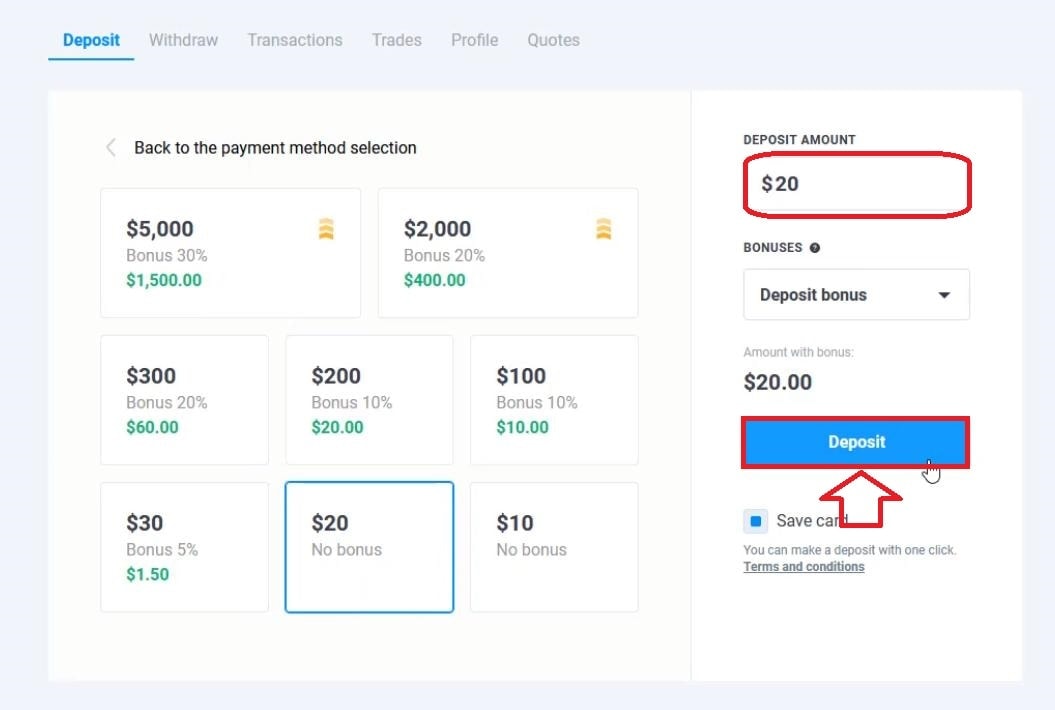
Step 4: Fill in the information on the VISA card to proceed with payment
The information includes:
- Cardholder’s name (Capital letters, formatted exactly as displayed on the physical plastic card).
- The 16-digit card number (inputted without blank spaces).
- Card expiration term (month and year format, MM/YY).
- CVV2/CVC code (the three security digits located on the reverse signature side of the card).

Then you click Pay to continue.
Step 5: Enter the OTP to confirm payment
Payment by VISA card always needs confirmation by code. At this point, you need to enter the OTP code from the bank sending it to your phone number to confirm the request. This 3D Secure verification prevents unauthorized card utilization.
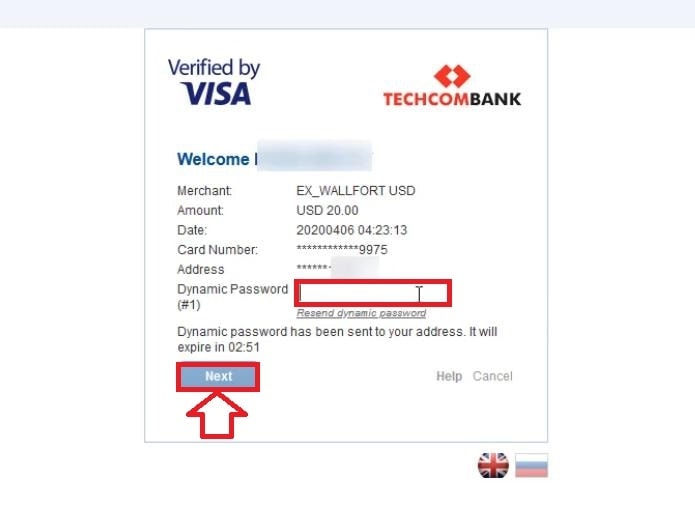
After completing the OTP code, click NEXT to continue.
Step 6: Wait for confirmation from Olymp Trade
Do not refresh the webpage or tap the back navigation while the gateway processes the transaction. Interrupting this stage can lead to database errors or double charging. A confirmation checkmark screen will load once authorized.

After the confirmation, your account will be credited.
Step 7: Check your Olymp Trade real account
You have completed all steps to top up your Olymp Trade account with Visa/MasterCard. You can start trading immediately. However, before trading, you can quickly check whether your account has been credited or not. View the top right-hand side header balance indicator to confirm updates.
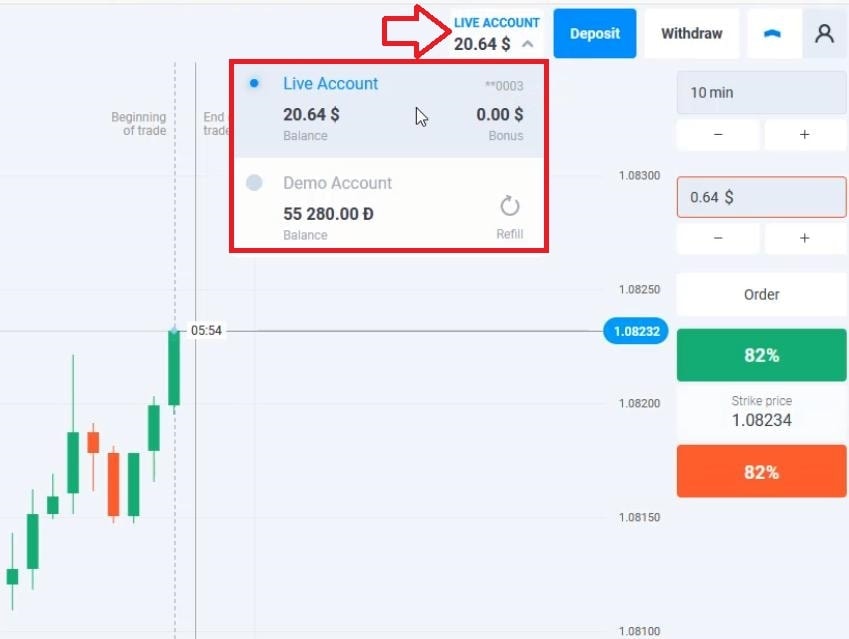
If your account balance is correctly displaying the deposit amount, you are ready to select your asset and trade. Always review your strategy rules prior to taking a market position.
Notes when depositing Olymp Trade with Visa or Mastercard
Some small notes when you deposit money into Olymp Trade with VISA/MasterCard.
- Currency Exchange Buffer: The amount used to deposit Olymp Trade on your card must be 2-5% larger than the amount you want to deposit. This amount is to pay for bank-level transaction and conversion fees when using the VISA card, preventing insufficient balance rejections.
- Keep Accounts Matching: Ideally, you should use your VISA MasterCard in your name. This will save you the hassle when withdrawing money with this card. Verification protocols require proof of ownership.
- Fast Funding Speed: Usually, only after 1-3 minutes, the money will be immediately deposited into your account. This is a strong point when using VISA/MasterCard. If after a while there is still no money in your account, you can contact Olymp Trade support for help.
Register an Olymp Trade account NowGet $10,000 Free for beginners
Comparative Analysis: Cards vs. Local NetBanking & E-Wallets
While card gateways offer direct, straightforward payment access, Olymp Trade supports a wide variety of secondary transaction portals. Depending on your primary country, you might want to compare the speed, transaction limits, and operational factors of Visa and Mastercard against local bank transfers (NetBanking) and digital e-wallets like Neteller and Skrill. Each has its own benefits and limitations regarding safety compliance, ease of access, and withdrawal routing.
Here is an direct HTML comparison table representing the technical parameters of the top funding sources on the platform:
| Feature | Visa / Mastercard | Local NetBanking | E-Wallets (Skrill/Neteller) |
|---|---|---|---|
| Processing Time | Instant (1-3 minutes) | 15 minutes to 4 hours | Instant (under 5 minutes) |
| Minimum Deposit | $10 / €10 | Varies by country ($15-$20 equivalent) | $10 / €10 |
| Olymp Trade Fees | 0% | 0% | 0% (E-Wallet deposit fees may apply) |
| Third-Party Fees | Possible bank conversion fees (1-3%) | Standard local bank transfer fees | Wallet funding fees (1.5% – 5%) |
| Security Level | Very High (3D Secure + 256-bit Encryption) | High (Bank tokenization & login) | High (PIN + 2-Factor Authentication) |
| Withdrawal Speed | Refund to card (up to 5-10 business days) | Direct to bank account (1-3 business days) | Instant to 24 hours |
Troubleshooting Common Visa & Mastercard Deposit Errors
While card transactions are highly optimized, errors can still occur. Recognizing the root cause of deposit declines will help you resolve the issues quickly.
1. Bank Blocks and Anti-Fraud Restrictions (MCC 6211)
If your deposit fails immediately with a decline error, it is rarely due to an Olymp Trade platform issue. Instead, it is typically a protective action by your card issuer. In international banking, every merchant is assigned a four-digit Merchant Category Code (MCC). Trading platforms, security brokers, and dealer transactions fall under the MCC 6211 category. Many banks have strict policies blocking cards from transacting with high-risk financial merchants or foreign exchange entities to prevent money laundering and fraud.
How to resolve: Contact your bank’s fraud detection hotline or account support. Inform them that you are attempting a secure, manual payment to Olymp Trade, verify your identity, and ask them to temporarily disable security filters or whitelist the merchant category on your card.
2. Insufficient Funds and Hidden Exchange Rates
A card transaction will be rejected if the required currency and exchange margin are not met. For example, if you attempt to deposit exactly $100, but your card has only $101 in equivalent local currency, the deposit may fail. This is because banks apply international transaction fees (cross-border fees) and currency conversion markups. The total amount requested from your balance may be $103 or $104, resulting in an “Insufficient Funds” error.
How to resolve: Always ensure your account has a buffer of at least 3% to 5% above your desired deposit amount to cover local bank currency conversion margins and international processing fees.
3. 3D Secure / OTP Authentication Failures
The 3D Secure protocol (Verified by Visa or Mastercard Identity Check) is an essential layer of security. If the OTP (One-Time Password) screen does not load, or if the text message never arrives on your phone, the transaction will automatically time out and fail.
How to resolve: Verify that your mobile device has a strong cellular signal, and confirm that your phone number on file with your bank is correct. Alternatively, log in to your banking app to see if you can authorize the payment via a push notification. Try clearing your browser’s cache or switching to the desktop app to bypass localized script-loading errors.
4. Third-Party Card Verification Violations
To adhere to strict anti-money laundering (AML) and counter-terrorist financing (CTF) regulations, Olymp Trade mandates that the owner of the trading account must also be the owner of the funding source. If you attempt to deposit using a card belonging to your spouse, sibling, or parents, the transaction may be declined. If the platform detects a name mismatch, your trading account could be suspended pending verification.
How to resolve: Always use a card registered in your name. If you do not have a Visa or Mastercard in your name, fund your account using local bank transfers, personal e-wallets, or cryptocurrency addresses registered to you.
The Psychology of Capital Funding: Defeating the “Revenge Deposit” Trap
Trading the financial markets is as much a psychological challenge as it is a technical one. The ease and speed of depositing funds via Visa and Mastercard can become a double-edged sword for traders who struggle with emotional self-regulation.
The Danger of Deposit Chasing
Deposit chasing, or revenge depositing, is a destructive behavioral pattern similar to gambling addiction. After experiencing a series of consecutive losses, a trader’s emotional state often shifts from rational analysis to anger, frustration, or fear. To recover lost funds quickly, the trader may make a rapid, unplanned deposit using their Visa or Mastercard, hoping that their next trade will “make everything back.”
This emotional state bypasses the trader’s strategic rules, leading to impulsive entries, excessively large position sizes, and high-risk strategies. Under the influence of strong emotions, traders often resort to hazardous trading systems such as:
- Martingale Trading: Doubling the trade size after every loss in an attempt to recover the cumulative losses with a single win. In live markets, Martingale can deplete an entire trading account in a matter of minutes if a sustained trend moves against the position.
- Loss-Holding (Bagholding): Refusing to close losing trades in the hope that the market will reverse. This ties up free margin and risks margin calls, especially when leverage is high.
- Grid Averaging: Adding multiple entries to a losing position (averaging down) in a volatile market. This compounds risk without any structural justification.
Warning: Olymp Trade strongly advises against these high-risk trading systems. These models rely on the assumption of unlimited capital, which retail traders do not possess. Instead, professional traders rely on consistent, mathematically sound risk mitigation techniques.
Steering Toward Professional Risk Management
To establish a sustainable, professional trading system, you should replace speculative, high-risk behaviors with structured capital preservation rules:
- The 2% Rule: Never risk more than 1% to 2% of your total account balance on a single trade. For example, if you deposit $1,000, your maximum risk per trade (the amount you would lose if your stop-loss is triggered) should be limited to $10 or $20. This allows your account to withstand a prolonged losing streak without facing liquidation.
- A Strict Risk-to-Reward (R:R) Ratio: Design your trades with a minimum R:R ratio of 1:2. This means that for every $10 you risk, your profit target should be at least $20. By maintaining a positive risk-to-reward ratio, you can remain profitable even if you lose more than half of your trades.
- Volume-Verified Entries: Never enter a trade based solely on gut feeling or simple price movement. Validate your technical setups using volume indicators (such as Volume Profile, Accumulation/Distribution, or On-Balance Volume) and price action confirmations. A volume-verified entry ensures that institutional buying or selling pressure supports your direction, increasing the statistical probability of a successful outcome.
- Strict Capital and Deposit Limits: Establish daily, weekly, and monthly loss ceilings and deposit caps. For instance, you might set a rule that if you lose 5% of your total capital in a single day, you will close your trading application and not trade again until the next session. Likewise, establish a fixed deposit budget that you will not exceed, regardless of market conditions. If you reach your deposit limit, you must step away, review your trading journal, and analyze your errors.
Card Security & Transaction Safety Features
Security is the primary concern when entering financial credentials online. Olymp Trade protects client information using bank-grade safety architecture:
- End-to-End Encryption: The platform uses 256-bit SSL encryption to protect data in transit. Your card details are shielded from interception when sent to the processing network.
- PCI-DSS Compliance: All payment channels adhere to the Payment Card Industry Data Security Standard (PCI-DSS), which governs the handling, storage, and processing of credit card numbers.
- Tokenized Transactions: The platform does not store your full card numbers or security CVV2 codes on its servers. Instead, transactions are tokenized, replacing sensitive details with unique digital identifiers.
To maximize your protection, avoid logging in to your account from public devices or unsecured public Wi-Fi networks. Enable two-factor authentication (2FA) on your Olymp Trade profile for an extra layer of access control.
Frequently Asked Questions
Can I use a credit or debit card that belongs to a family member or friend to deposit on Olymp Trade?
No. Olymp Trade strictly complies with Anti-Money Laundering (AML) and Know Your Customer (KYC) regulations. The card used to fund your account must be legally registered under the exact same name as your Olymp Trade account. Attempting to use a third-party card will cause the payment to be flagged, potentially leading to a permanent suspension of your trading account.
Why is my Visa or Mastercard deposit being declined?
The most common cause for card declines is a security block imposed by your bank on international brokerage services (Merchant Category Code 6211). Other reasons include insufficient funds (failing to account for currency conversion fees), missing or inactive 3D Secure / OTP verification, or expired card dates. You can resolve this by calling your bank’s fraud support department to whitelist the merchant.
How long does a Visa/Mastercard deposit take to appear in my trading account?
Deposits made via credit or debit cards are usually instantaneous, reflecting in your Olymp Trade balance within 1 to 3 minutes. In rare cases where processing networks experience latency, it may take up to 24 hours. If the funds have not arrived after one day, contact customer support with your digital receipt.
Does Olymp Trade charge deposit fees for card transactions?
No, Olymp Trade maintains a 0% commission structure on all incoming deposits. However, your card issuer may charge international processing fees or currency conversion fees if you are depositing a currency (like USD or EUR) different from the card’s native currency.
Can I withdraw trading profits back to my Visa or Mastercard?
Yes. Under the platform’s security guidelines, you must first withdraw your initial deposit amount back to the card used for deposit. Once the principal amount is returned, any additional net profits can be withdrawn to the same card, an e-wallet, or a bank transfer under your name.
What is the minimum deposit limit for cards on Olymp Trade?
The minimum deposit amount when using a Visa or Mastercard on the platform is $10 or €10. This makes it an ideal option for beginner traders who want to test live markets with minimal exposure.