


Thanks to the convenience and speed, Visa and Mastercard are the most preferred ways to deposit by most traders in Exness. In this article, we will guide you to deposit your Exness account with Visa and Mastercard in the most detailed way, ensuring security, speed, and regulatory compliance.
Key Takeaways
- Strict Card Ownership Rules: Exness strictly prohibits third-party card deposits. The name on your Visa/Mastercard must match your registered Exness account name exactly to avoid account suspension.
- Mandatory Card Verification: To use a card for deposits and withdrawals, you must verify ownership by uploading photos of the front and back of the card (with security-sensitive details masked).
- Processing Times & Fees: Card deposits are instant and Exness charges zero deposit fees (though your bank/card issuer may charge conversion or transaction fees).
- Withdrawal Rule (Refund Policy): Due to anti-money laundering (AML) regulations, you must withdraw your initial deposit back to the same card as a refund before withdrawing profits via other methods.
- Risk Management Priority: Successful trading relies on strict risk management (such as the 1% or 2% risk rule per trade) rather than high-risk systems.
Register an Exness account NowGet $1,000 Free for beginners
Why Deposit on Exness Using Visa/Mastercard?
Exness is widely recognized as one of the world’s most reliable and technologically advanced retail brokers. To facilitate a seamless trading experience, Exness provides various payment gateways. Among these, credit and debit cards issued by Visa and Mastercard are globally preferred. The primary benefit of using a bank card to deposit on Exness is immediacy. While some payment methods require hours or days to process, card payments are credited to your trading account instantly, allowing you to react to fast-moving market opportunities without delay.
Additionally, bank cards offer a high level of security. Exness complies with the Payment Card Industry Data Security Standard (PCI DSS), meaning all your card data is encrypted and handled through highly secure channels. However, to maintain this high standard of security and comply with international financial regulations, Exness enforces strict rules regarding card usage, verification, and withdrawals. Understanding these rules is crucial to prevent transaction blocks or account restrictions.
Safety Warning: Third-Party Card Ban and Name Matching Rules
CRITICAL WARNING: Exness strictly prohibits the use of third-party payment methods. The name on the credit or debit card used to deposit funds must match the name registered on your Exness account exactly. Using a card belonging to a spouse, family member, friend, or business partner is a direct violation of Exness security policies. Any attempt to use a third-party card will result in the deposit being automatically declined, and it may trigger a temporary or permanent suspension of your trading account for compliance review.
This rule is not arbitrary; it is put in place to comply with global Anti-Money Laundering (AML) regulations and Counter-Terrorist Financing (CTF) laws. Brokers are legally required to verify the source of all client funds. Furthermore, card verification is a mandatory process. While you may be allowed to make initial small deposits before completing full verification, you will eventually be required to verify ownership of the card by uploading clear photos of the physical card. We will discuss the specific card verification steps in detail later in this guide.
Video on how to deposit your Exness account with Visa / Mastercard
How to deposit Exness with Visa/Mastercard in 5 steps
Depositing funds into your Exness trading account via Visa or Mastercard is a straightforward process that can be completed in a few minutes. Below is a detailed, step-by-step breakdown of the deposit procedure.
Step 1: Login and choose the payment method
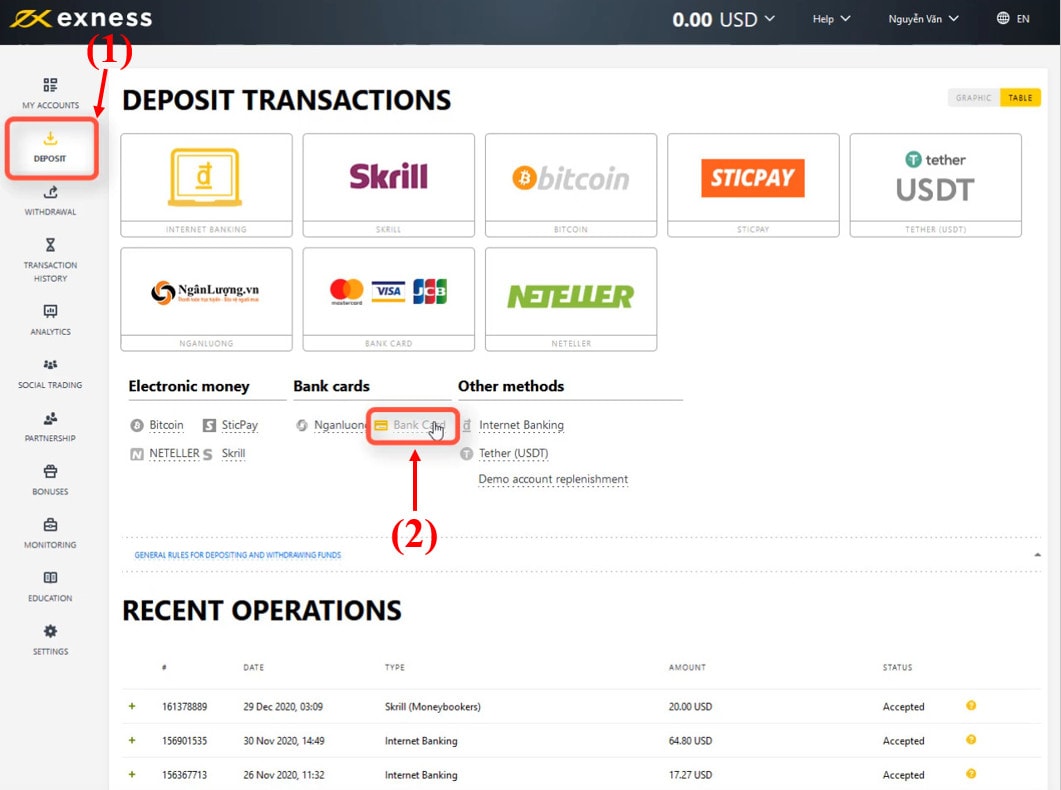
First, navigate to the Exness website and log in to your Personal Area using your registered email address and password. Once logged in, look at the main navigation menu on the left side of your screen and click on the “Deposit” tab. You will be presented with a list of available payment options. Locate the “Bank Card” option (which features the Visa and Mastercard logos) and select it as your payment method.
Step 2: Enter the amount you want to deposit into Exness
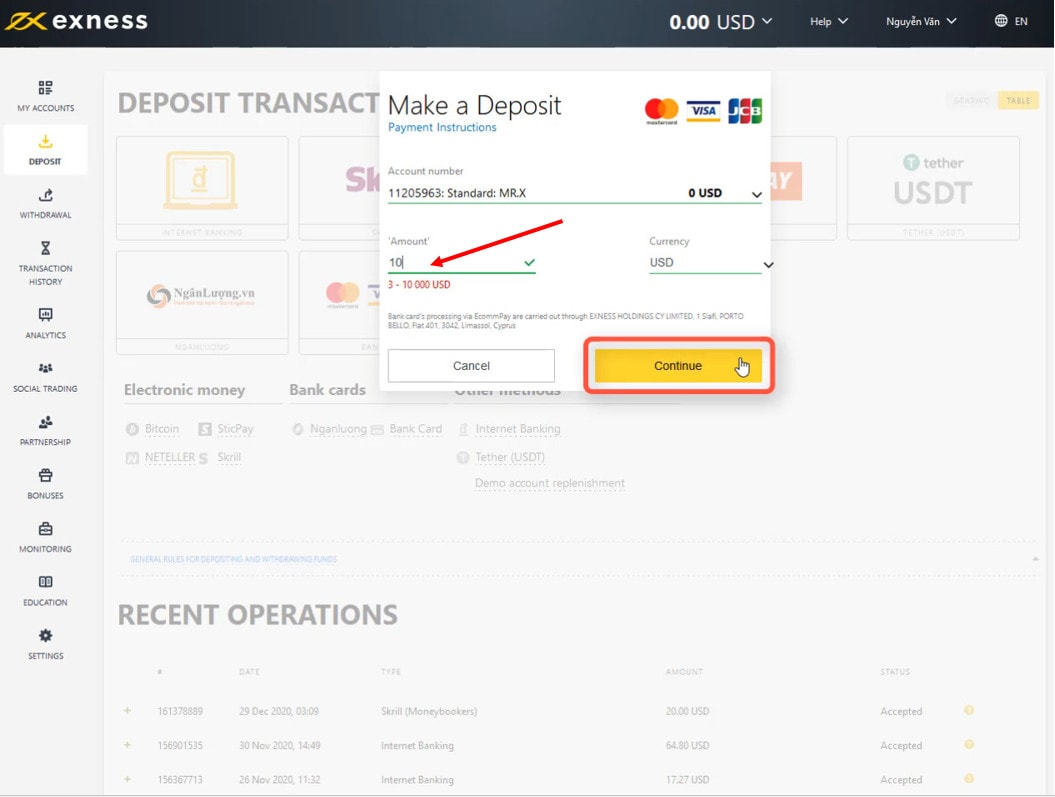
In the deposit configuration window, you need to select the specific trading account you wish to fund (if you have multiple MT4/MT5 accounts). Next, choose your preferred currency from the dropdown menu (e.g., USD, EUR, or your local currency). In the “Amount” field, input the total value you want to deposit. Ensure the amount complies with the minimum and maximum limits shown on the screen. Once you have specified the deposit amount, click the “Continue” button.
Step 3: Fill out information on Visa/Mastercard
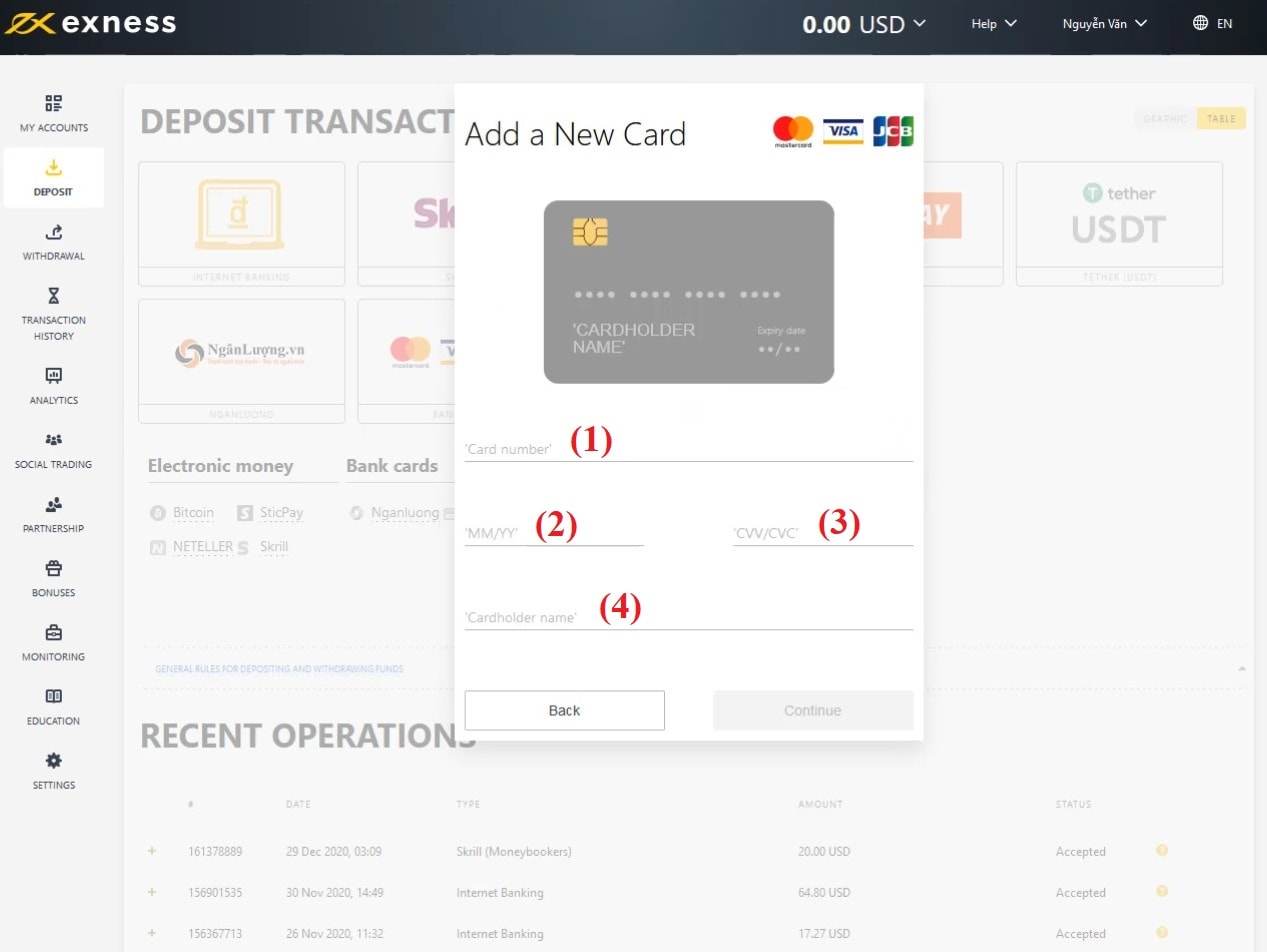
You will now be redirected to the secure card details entry page. You must enter the following parameters exactly as they appear on your physical or virtual card:
- (1) Card number: The 16-digit number printed on the front of your card. Enter this without spaces.
- (2) Expiration Date (MM/YY): The month and year the card expires (e.g., 08/28 for August 2028).
- (3) CVV/CVC: The 3-digit card verification value located on the signature strip on the back of your card.
- (4) Cardholder name: The exact name printed on the card, spelled in capital letters and without special characters or accents.
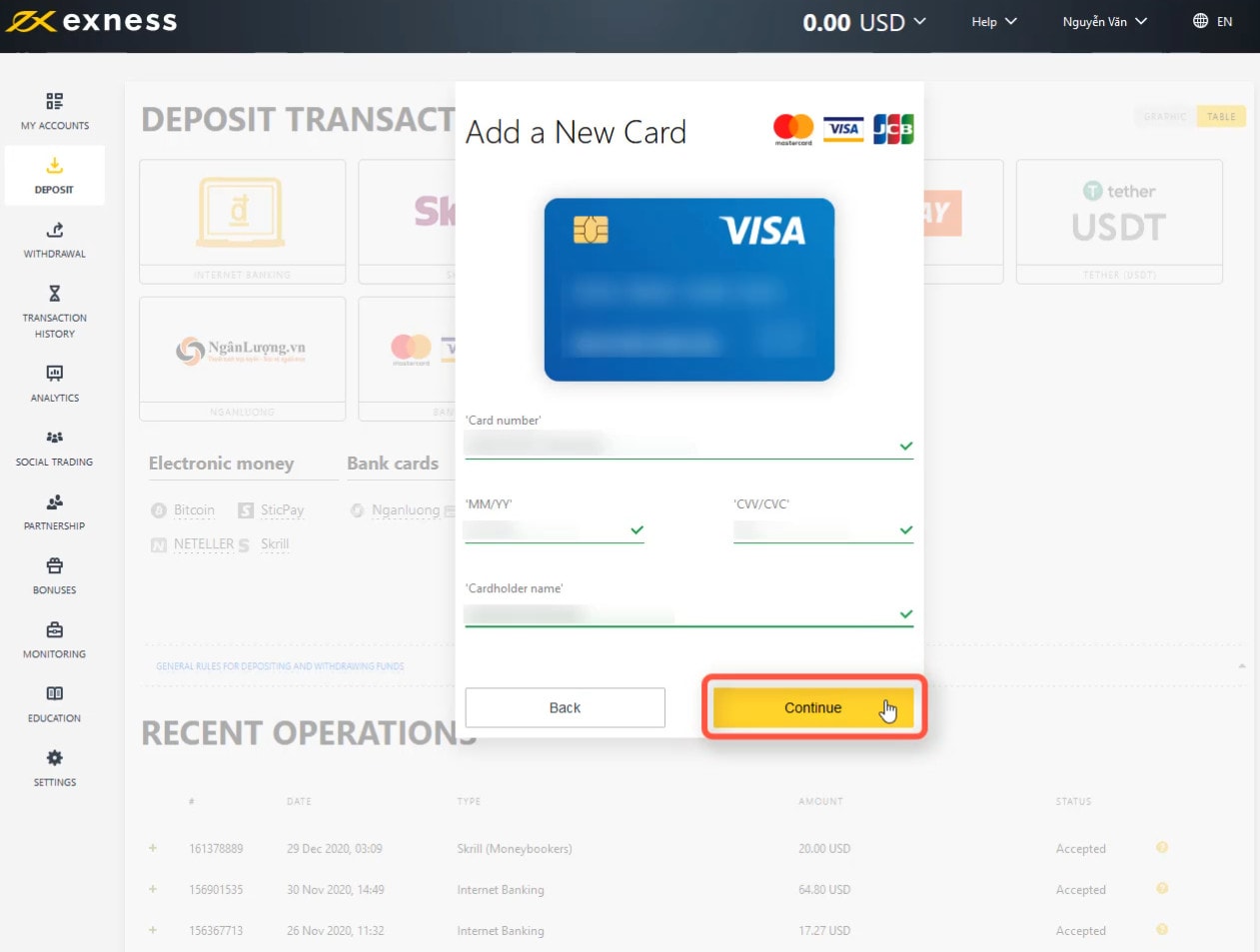
As you fill in the fields, the Exness payment portal will automatically validate the format of the numbers. Once all required card details are entered correctly and meet the verification rules, green checkmarks will appear next to each field. Once you see all green checkmarks, click the “Continue” button to move forward.
Step 4: Confirm the amount you want to deposit
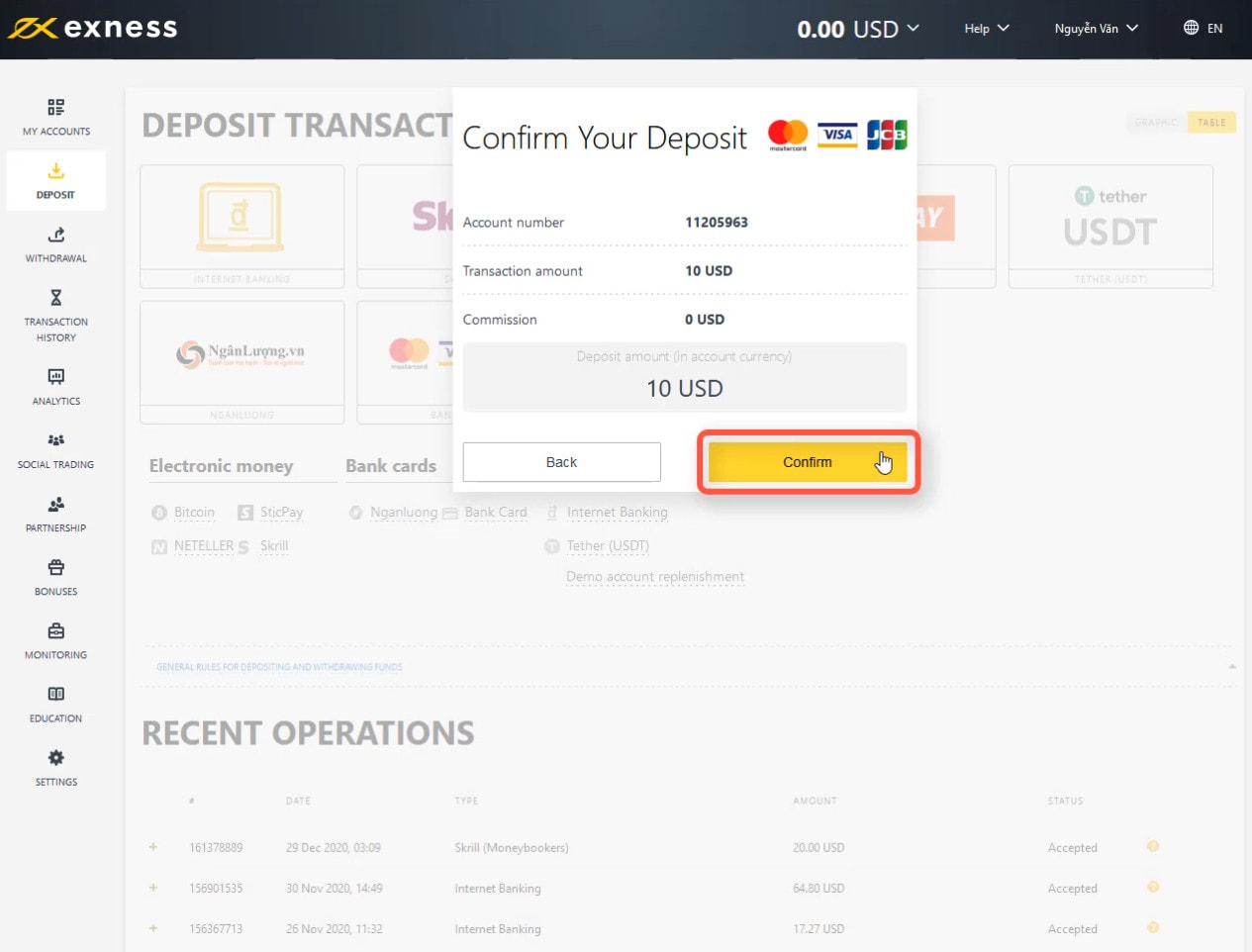
Before the transaction is sent to your card issuer for authorization, Exness will show a summary of the payment request. This includes the transaction amount, the target trading account, the payment method, and the commissions (which will be 0%). Take a moment to verify that all the information is accurate. If everything is correct, click the “Confirm” button to authorize the transaction.
Step 5: Fill in the OTP to confirm payment request
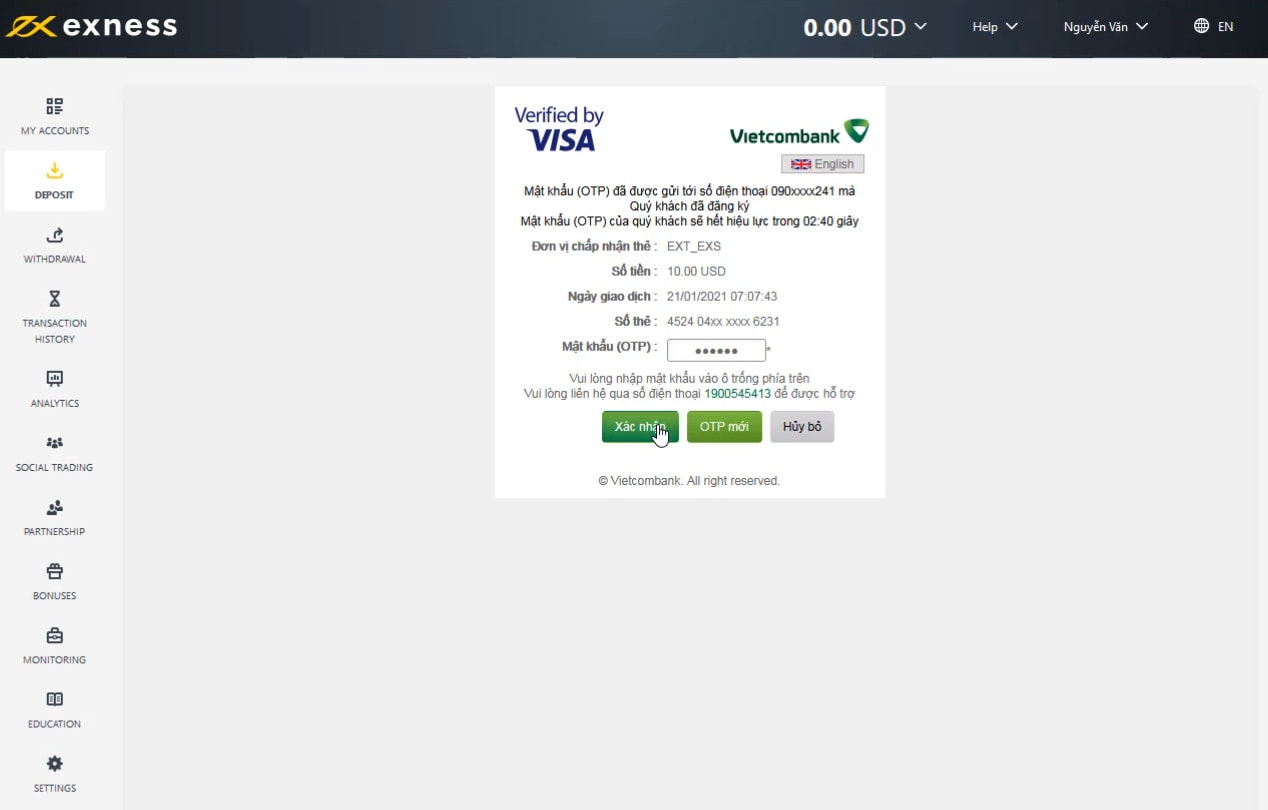
To prevent unauthorized card use, your card-issuing bank will initiate a 3D-Secure check. You will be redirected to your bank’s secure verification page, and a One-Time Password (OTP) will be sent via SMS to the mobile phone number registered with your bank (or generated via your bank’s mobile app). Enter this 6-digit OTP into the input field on the verification screen and click “Submit” or “Confirm” to authorize the payment.
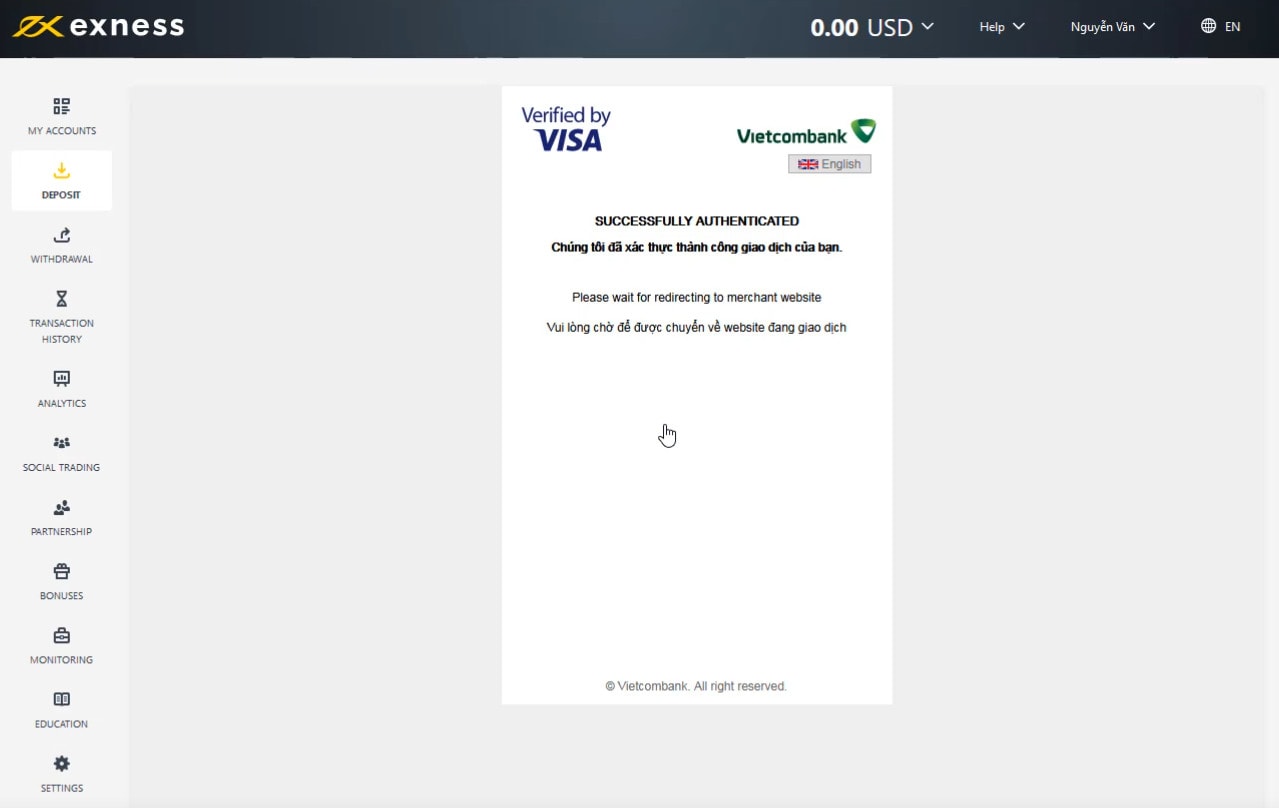
Once the bank processes the request and approves the funds transfer, you will be redirected back to the Exness platform. You will see a payment success screen confirming that the funds have been credited to your selected trading account instantly. You can now open your trading platform (MT4, MT5, or Exness WebTrader) and start trading.
How to Verify Your Visa/Mastercard on Exness
To protect traders against card fraud and comply with international regulatory frameworks, Exness requires all users who deposit via bank card to undergo card verification. If you do not verify your card, future deposits using that card may be blocked, and you will not be able to execute withdrawals back to the card.
To verify your card, you must upload high-quality photographs or scanned copies of the physical card to the “Documents Verification” section of your Exness Personal Area. The verification requires two separate files: one for the front side of the card, and one for the back side. However, for security reasons, you must mask (hide) specific details before uploading these images:
- On the Front of the Card: The cardholder’s name, the expiration date, and the bank logo/name must be clearly visible. You must **mask the middle 6 digits** of the 16-digit card number. For example, if your card number is 1234-5678-9012-3456, you should hide the digits 5678-90, leaving only “1234-56XX-XXXX-3456” visible.
- On the Back of the Card: The cardholder’s signature strip must be visible. Most importantly, you **must completely cover or mask the 3-digit CVV/CVC code**. Never upload an image showing your CVV code, as this represents a severe security risk.
If you are using a virtual card (such as a digital card issued via a banking app), you can upload a screenshot of the card details page in your app. The screenshot must display the bank logo, cardholder’s name, and the same masked digit format (first 6 and last 4 digits visible). Exness compliance teams typically review and approve card verification uploads within 24 hours. Once verified, the card is linked to your profile and can be used seamlessly for future transactions.
Exness Deposit Limits, Fees, and Supported Currencies
Before initiating a deposit, it is helpful to understand the transaction structures, fees, and currency rules. Exness is highly competitive when it comes to financial terms, offering zero commission deposits across almost all major payment methods, including credit/debit cards.
While Exness itself does not charge fees for credit or debit card deposits, your card issuer or bank might. This typically occurs in two situations: international transaction fees, and currency conversion fees. If your Exness account is denominated in US Dollars (USD), but your credit card is denominated in Euros (EUR) or Vietnamese Dong (VND), the issuing bank will convert the currency to USD at their local exchange rate, which may include a markup. To avoid these conversion fees, it is highly recommended to open your Exness trading account in the same currency as your deposit card, or use cards with low international transaction markups.
In terms of transaction limits, card deposits have a typical minimum limit of **$10** and a maximum limit of **$10,000 per transaction**. These limits are subject to change depending on your country of registration and whether your account is fully verified. Standard accounts have lower entry barriers, while professional account tiers (such as Raw Spread, Zero, or Pro) require an initial deposit of $200 or more, though subsequent deposits can be made at the minimum card limit.
Comparison of Exness Payment Methods
To help you choose the best payment method for your trading needs, the table below compares bank cards with other popular payment methods available on the Exness platform.
Troubleshooting Common Exness Card Deposit Errors
While depositing via Visa or Mastercard is generally stable, you may occasionally run into errors that cause the payment to fail. Understanding these issues will help you resolve them quickly.
1. “Transaction Declined by Issuer”
This is the most common card deposit error. It indicates that your bank has actively blocked the transfer. This happens for several reasons: your card may not be authorized for international transactions, your daily e-commerce spending limit is too low, or the bank’s automated security systems flagged the transaction as unusual. To fix this, call your bank’s customer service helpline, confirm that you are authorizing payments to Exness, and ask them to enable international transactions and increase your online limit.
2. “3D-Secure Authentication Failed”
If you fail to receive the OTP via SMS, or enter the incorrect verification code on the bank gateway, the transaction will fail. Make sure your phone has signal reception. If the code does not arrive, click the “Resend OTP” button. If the problem persists, check with your bank to verify that your current phone number is linked to your card’s 3D-Secure service.
3. “Card Mismatch / Third-Party Declined”
If you attempted to deposit using a card belonging to someone else, the Exness security system will block it. If the name on your card differs slightly from your Exness profile name (due to spelling errors, middle names, or suffixes), the system may flag it. If your legal name is spelled differently, you must contact Exness support to reconcile your profile details before depositing.
4. Technical Session Timeout
If the payment page takes too long to load or freezes, the payment gateway session will time out. Do not refresh the page during transaction processing. Instead, check your bank balance to confirm if funds were deducted. If they were not, clear your browser’s cookies and cache, disable any active VPN services, and attempt the deposit again. Alternatively, you can use the official Exness Trader mobile app, which is optimized for card payments.
Exness Refund and Withdrawal Rules for Card Depositors
One of the most important concepts to understand when depositing on Exness via Visa/Mastercard is the withdrawal hierarchy. To comply with anti-money laundering regulations, Exness enforces a strict “Refund first, profit second” policy.
When you deposit using a card, Exness records that transaction as a card purchase. When you want to withdraw money, the system requires you to refund the exact amount you deposited back to the card before you can withdraw profits. Here is a clear example of how this works:
- Scenario: You deposit $500 using your Visa card. After several successful trades, your account balance increases to $1,200 (a profit of $700).
- Step 1: The Refund. When you request a withdrawal, you must first withdraw $500 back to the exact same Visa card. Exness processes this as a “refund transaction.” There are no fees for this.
- Step 2: The Profit Withdrawal. Once the $500 refund has been completed and credited to your card, you can withdraw the remaining $700 profit. For profit withdrawals, you can choose alternative methods, such as a local bank transfer, Neteller, Skrill, or cryptocurrencies (USDT). You cannot withdraw profits back to your bank card if the card refund amount has not been met.
Card refunds can take anywhere from **3 to 10 business days** to appear in your bank account, depending on your bank’s internal processing procedures. Exness processes refund requests immediately on their end, but the bank’s processing cycles dictate when the funds will be available in your balance.
Trading Risk Management: The Key to Long-Term Profitability
Securing a quick and easy deposit method like Visa/Mastercard is highly beneficial, but it is only the first step in your trading journey. The ultimate success of a trader depends on how they manage their capital once it is inside the trading account. Unfortunately, many novice traders fall into the trap of using high-risk betting systems in financial markets, which leads to rapid account liquidation.
It is important to emphasize that risky trading models such as Martingale, loss-holding, and grid averaging must be avoided.
- The Martingale System: This strategy involves doubling your position size every time you experience a loss, with the goal of recovering all losses with a single win. In markets with strong trends, a series of consecutive losses will increase your margin requirements exponentially, quickly wiping out your deposit.
- Loss-Holding (Holding Losing Positions): Refusing to accept a loss and holding on to a trade in the hope that the market will reverse is a primary cause of account blowouts. Without a stop-loss, a single bad trade can deplete your entire account balance.
- Grid Averaging: Placing multiple buy or sell orders at regular intervals as the price moves against you (averaging down) is highly risky. While it can work in sideways markets, a strong trend in one direction will trigger multiple margin calls.
Instead of relying on these high-risk systems, successful traders focus on professional risk management strategies:
- The 1% or 2% Risk Rule: Never risk more than 1% to 2% of your total trading capital on any single trade. If you have a $1,000 account, your maximum risk per trade (the distance to your stop-loss multiplied by the contract size) should not exceed $10 to $20.
- Risk-to-Reward Ratio (R:R): Always target trades that offer a favorable risk-to-reward ratio, such as 1:2 or 1:3. This means that if you risk $20, your profit target must be at least $40 or $60. With a 1:2 R:R, you only need to win 34% of your trades to break even.
- Pre-Defined Exit Orders (SL and TP): Never enter a trade without setting a hard Stop-Loss (SL) and Take-Profit (TP) order. Do not change your stop-loss mid-trade out of emotion.
- Volume-Verified Entries: Do not enter trades based on impulse. Ensure your technical setup (e.g., support/resistance retests, breakout patterns) is supported by market structure, price action, and volume analysis. This ensures that you trade with the flow of smart money rather than fighting market momentum.
Conclusion
Depositing funds on Exness using Visa or Mastercard is a quick, safe, and efficient way to fund your trading activities. By following the 5-step process outlined in this guide, ensuring your account information matches your card details, and keeping your card verified, you will avoid transaction delays. Remember to keep the withdrawal refund rules in mind and use professional risk management rather than high-risk systems. Responsible trading, disciplined position sizing, and proper risk control are what turn a funded account into a consistently profitable tool.
If you encounter any issues during your deposit process or need assistance verifying your bank card, feel free to leave a comment below. We will review your questions and respond as quickly as possible.
Register an Exness account NowGet $1,000 Free for beginners
Frequently Asked Questions (FAQ)
Are there any fees for depositing on Exness via Visa/Mastercard?
No, Exness does not charge any internal transaction fees or commissions for deposits made with Visa or Mastercard. However, your card-issuing bank may apply international transaction fees or currency conversion fees if the currency of your card does not match your Exness account base currency.
Can I use a credit or debit card belonging to someone else to deposit?
Absolutely not. Exness has a strict zero-tolerance policy for third-party deposits. The name registered on your Exness profile must match the cardholder’s name printed on the card exactly. Using a card that belongs to anyone else, including close relatives or business associates, will result in transaction rejection and potential account closure.
How long does it take for a card deposit to reflect in my trading account?
Deposits made via credit or debit cards (Visa/Mastercard) are processed instantly. The funds are credited to your Exness trading account balance immediately, allowing you to begin trading within a few seconds after payment confirmation.
Why must I mask the digits on my card during the verification process?
Masking card details is a vital security practice that protects you against potential fraud. Exness only requires the first 6 and last 4 digits of your card number, your name, and expiry date to verify ownership. You must mask the middle 6 digits on the front and cover the 3-digit CVV/CVC code on the back before uploading the images.
How do withdrawals work if I deposit using a credit or debit card?
Exness operates under strict anti-money laundering guidelines. If you deposit funds using a credit or debit card, you must withdraw your initial deposit back to that exact same card as a “refund transaction” first. Once your total deposited amount has been returned to the card, you can withdraw your remaining trading profits using alternative payment systems, such as local bank transfers or e-wallets.


